Photo Talks: Meme Text Bubbles
- 4.3
- Rating
- 1.00M
- Installs
- Free
- Price

 Analysis by App-foxy
I like comic-making apps that let me get from a camera roll to a shareable joke without turning the process into a design project. Photo Talks: Meme Text Bubbles takes that direct approach. It is a free comics app from Fueneco built around adding words and visual reactions to photos, with speech bubbles, stickers, frames, and meme-style text as the main creative tools.
That focus makes it easy to understand within a few minutes. You choose an image, decide what the people or objects in it should “say,” adjust the presentation, and save the result. In my experience, the appeal is not sophisticated illustration; it is speed and the familiar language of comic panels and internet memes. If you want to make a funny image for a group chat, turn a pet photo into a small joke, or add a caption that feels more expressive than plain text, this app has a clear purpose.
The app sits in the Comics category rather than trying to be a full photo editor. That distinction matters. I would not open it expecting detailed retouching, layered graphic design, or the precision of a desktop layout tool. I would open it when the photo already works and needs a punchline, a character voice, or a visual frame around the idea.
You May Also Like

 AccuWeather: Weather Radar
AccuWeather Review: A Quick, Clear Forecast for Everyday Decisions
For everyday plans, the best forecast is the one you can understand quickly. AccuWeather makes rain timing, radar, and local conditions easy to act on, with a few trade-offs.

 Hill Climb Racing
Why Hill Climb Racing Still Turns Crashes Into One More Run
A tiny car, a bumpy hill and one more upgrade: Hill Climb Racing keeps resurfacing because its simple chaos makes every near-miss feel personal.

 AliExpress - Shopping App
AliExpress Makes Global Shopping Feel Personal, but Shoppers Bear the Risk
AliExpress turns a global marketplace into a pocket-sized discovery engine. Its reach is useful, its shopping loop compelling, and its trade-offs easy to miss.

 Lords Mobile: Kingdom Wars
Lords Mobile Is a Kingdom-Building Routine, Not a Quick Match
A case-by-case verdict on the building, battles, device demands, and social commitments that make Lords Mobile rewarding for some players and exhausting for others.

 PDF Scanner app - TapScanner
TapScanner Makes Paperwork Easier to Capture, Check, and Share
TapScanner makes scanning with a phone feel less like a rescue operation and more like a dependable step in getting work done. Its capture tools are useful, though not flawless.

 Block Blast!
 Shows How Much a Puzzle Game Can Leave Out
A quiet grid game shows why puzzle players increasingly value instant clarity, repeatable skill and low-pressure play—and where the genre still needs to catch up.
More From Our News Desk
View All News


What the free app delivers in everyday use
I find the free format most useful when I already have a photo and a punchline, but want to make the joke feel like a small exchange rather than a plain caption. A good habit is to check the image at the size your friends will actually see it: if the bubble or lettering becomes hard to read, simplify before adding decoration. That practical test leads naturally to the question of how the app’s current version fits its long history.
A simple route from photo to comic
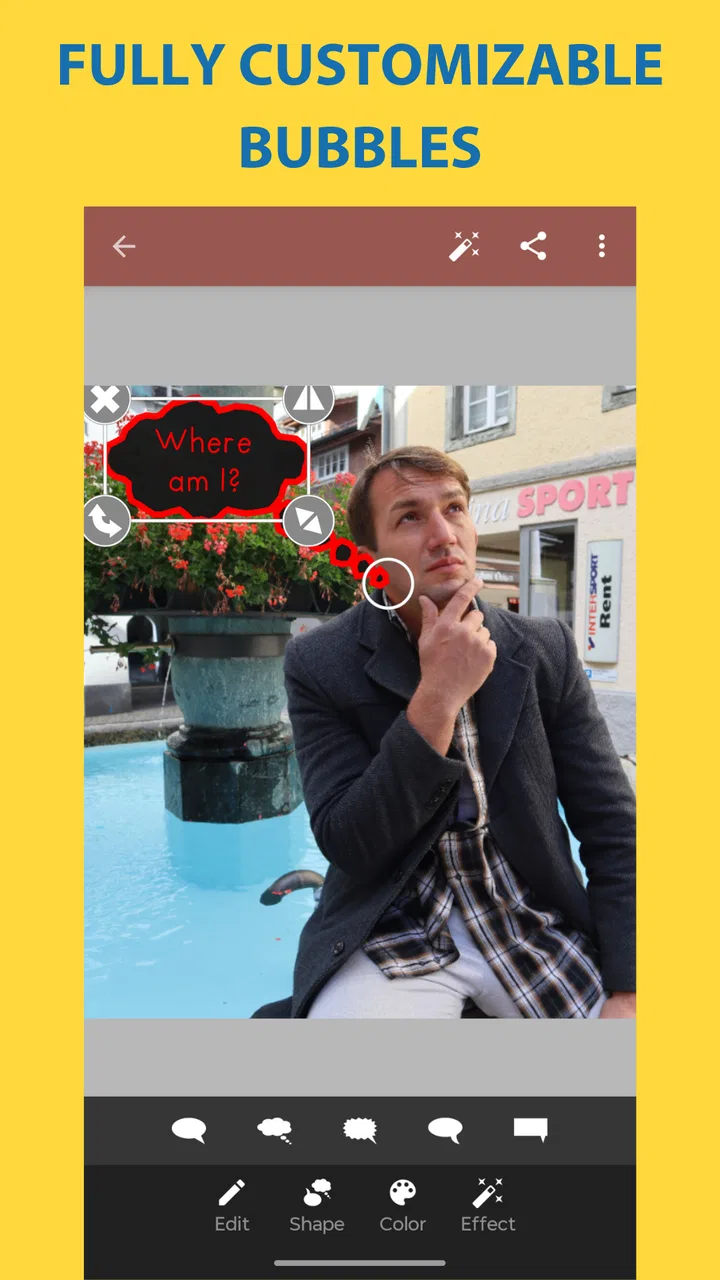
The strongest part of the experience is the compact workflow. A normal photo can become a comic-like image through a few decisions: where the text belongs, how the speech bubble points, which sticker supports the joke, and whether a frame gives the composition a finished edge. That is much less intimidating than starting with a blank canvas full of professional editing controls.
I found the speech-bubble approach especially useful when the humor depends on assigning a voice to something. A dog looking away can appear to be refusing a request, a friend caught mid-expression can receive an exaggerated reply, and an ordinary object can become part of a visual conversation. The bubble does more than display a caption: its shape and position help establish who is speaking.
For the best result, I recommend choosing the image before thinking about decoration. Look for a face, object, or empty area that naturally gives the text somewhere to sit. If the photo is already crowded, several stickers and a large bubble can bury the original moment. One of the app’s practical lessons is that a short line in the right place usually works better than filling every available corner.
Useful for quick jokes, not just traditional memes
The obvious use is a meme, but the format is broader than that. I can see it working for a birthday greeting, a playful reaction to a travel photo, a mock conversation between pets, or a small visual announcement for friends. The comic treatment gives a personal image more personality without requiring the sender to write a long message.
A realistic everyday scenario would be sending a photo from a group outing to someone who missed it. Instead of attaching a plain caption, I could place a bubble over a friend’s expression and add a second line near another person, turning the image into a tiny exchange. That takes the photo beyond documentation while keeping the original moment recognizable.
It can also help when a picture is funny but the context is not immediately obvious. A short bubble can guide the viewer toward the intended joke. The trade-off is that the app cannot create the humor for you. The source photo and wording still do most of the work, so weak material will remain weak even after adding visual elements.
How I would build a cleaner result
I would start with one main bubble, then add a second only if the image genuinely contains two speakers or two competing ideas. This keeps the reading order clear. If I use a sticker, I would treat it as punctuation rather than the subject: a small visual accent can reinforce surprise, confusion, or celebration, while several unrelated stickers may make the image feel random.
Frames are most helpful when the finished image is meant to look like a deliberate comic rather than a caption pasted onto a photograph. A frame can separate the picture from a busy chat background and make the composition feel more complete. On the other hand, if the original photo has a strong edge or a carefully balanced crop, adding a frame may make it feel boxed in.
Text placement deserves more attention than beginners usually give it. Avoid covering eyes, hands, signs, or the object that makes the photo funny. I also prefer short phrases that can be read at a glance. The app is designed for visual communication, so a bubble containing a paragraph works against its main strength.
What the app is, and what it is not
Photo Talks: Meme Text Bubbles is best understood as a focused comic-caption tool. The feature set described by its core experience—text, speech bubbles, stickers, and frames—supports quick visual jokes and casual creative edits. That is enough for many people, especially those who do not want to learn a complicated editor.
It is not the right choice for someone looking for advanced photo correction, elaborate typography, professional social-media templates, or a serious comic-production workspace. A general photo editor will usually be better for color adjustments and detailed cropping. A dedicated design application will be stronger when exact alignment, reusable layouts, or more controlled text styling matters. A drawing app will be the better fit if the goal is to create artwork from scratch rather than annotate an existing photo.
This narrower purpose is a strength when speed matters, but it also defines the ceiling. The app helps me finish a small idea quickly; it does not replace a broader creative toolkit.
Value when access costs nothing
The clearest value point is the price: the app is free. That makes experimentation easy, because I can try the comic format without committing money to a specialized editor. For occasional use, that is meaningful. If I only want to make a funny image now and then, a free focused tool can be more sensible than paying for a larger suite filled with controls I will never touch.
Free access also changes how I judge the app. I do not need it to compete feature-for-feature with professional software. I need it to make its central task convenient and enjoyable. On that measure, the combination of photos, speech bubbles, stickers, and frames gives the app a practical reason to exist rather than merely duplicating a basic caption field.
At the same time, free does not automatically mean ideal for every person. The value depends on whether the comic format matches your habits. Someone who wants polished marketing graphics may get more useful results from a paid design tool, even if that tool takes longer to learn. Someone who only adds a sentence to photos may find the dedicated bubble-and-sticker workflow unnecessary.
Signs of a well-established app, with an older foundation
The app was released on July 27, 2012, and its current version is 5.04. That history suggests a product that has been around for a long time rather than a brand-new experiment. It has a 4.3 average from around eleven thousand ratings, while the app has passed one million installs. Those figures indicate that the concept has found a substantial audience, although popularity alone cannot tell me whether its style matches my preferences.
The minimum operating-system requirement is Android 6.0. For people using a compatible Android device, that keeps the entry barrier relatively broad. I would still check the current store page on the specific phone before relying on it for an event or trip, especially if the device is old and the image workflow matters. Compatibility is only one part of convenience; screen size and camera-roll organization can affect how pleasant editing feels.
The Teen content rating is also worth noticing. It fits the app’s meme and comic context, but it is a reminder that the tone of user-created images depends on what people choose to write and share. The tools themselves are neutral. A family using the app with younger children should still treat the finished content and sharing destination as separate decisions.
Small trade-offs that affect the final image
The first trade-off is speed versus control. A focused interface can help me finish a joke quickly, but it may not offer the same precision as a full editor. If I am particular about exact spacing, font treatment, or a complex multi-panel composition, I may reach the app’s limits sooner than I would like.
The second is visual consistency. Stickers and frames can make a quick edit feel lively, but they can also overpower a subtle photograph. The more decorative elements I add, the more important it becomes to check whether the original subject is still easy to understand. A restrained edit often looks more intentional than one that uses every available option.
The third is creative dependence on the source image. This is not a tool that turns an ordinary picture into a complete story by itself. It gives me a language for presenting the story, but I still need a readable expression, an amusing situation, or a clear contrast. That makes it rewarding for people with an idea ready, and less impressive for anyone expecting automatic comedic results.
There is also a workflow trade-off between a one-purpose app and an all-in-one editor. With a general editor, I may be able to crop, correct lighting, add text, and export from the same place. With this app, the comic treatment is more immediate, but I may prefer to prepare the image elsewhere if it needs substantial cleanup first. That extra step is acceptable for a special image, though less attractive for large batches.
Who will get the most from it
I would recommend it to casual meme makers, families creating playful photo messages, and anyone who enjoys giving pictures imaginary dialogue. It is particularly suitable for people who find professional design apps excessive. The focused controls make sense when the goal is a quick result rather than a long editing session.
It also suits users who communicate visually. If your friends respond well to reaction images, inside jokes, and photos with a character’s voice attached, the app offers more personality than a plain caption. The free price makes it easy to keep available for occasional moments without treating it as a major purchase.
I would be more cautious about recommending it to professional creators. If your work depends on brand consistency, exact typography, detailed retouching, or repeatable templates, a more advanced tool is likely to save time in the long run. The same applies to comic artists who need drawing, panel construction, and fine control over every element. This app is an accessible shortcut, not a replacement for a production environment.
Parents and educators might find the format useful for simple visual storytelling, but the Teen rating means I would not treat it as automatically suitable for every child or every sharing situation. The responsible choice is to supervise the content and decide where finished images can be posted or sent.
My practical recommendation before you commit to the workflow
Because access is free, the best test is direct: choose three different photos. Try one with a clear face, one with an animal or object, and one with a busy background. Use a single short bubble on each, then compare how readable they remain at a small size. This quickly reveals whether the app’s visual language suits you better than a normal caption editor.
I would also test the app with the kind of images I actually share, not random sample photos. If most of my pictures need serious cropping or color correction, I may prefer another tool first. If they already have a funny expression or situation and only need a voice, this app is much more convincing.
For better results, write the punchline before decorating. Decide who is speaking, keep the bubble close enough to make that clear, and add stickers or frames only when they support the joke. This workflow avoids the common problem of a visually busy image whose message takes too long to understand.
Final verdict on its free value
Photo Talks: Meme Text Bubbles earns its place as a lightweight comics app because it makes one specific transformation approachable: turning a normal photo into a visual joke or miniature conversation. I like that its value is easy to understand. There is no purchase decision to weigh here—the app is free—so the real question is whether speech bubbles, stickers, and frames fit the way you communicate.
My verdict is positive for casual creators who want quick, expressive edits and do not need professional-level control. The app’s established presence, broad install base, and solid 4.3 average suggest that the format has lasting appeal, while its older release history reminds me that it should be judged as a focused utility rather than a cutting-edge design suite.
Choose it when the idea is a funny photo with a voice; skip it when the job is advanced image editing or polished graphic production. For the right user, that narrow focus is exactly the point: I can open it with a photo, shape the joke around the moment, and finish without turning a simple message into a full design assignment.
FAQs for Photo Talks: Meme Text Bubbles
01What is Photo Talks: Meme Text Bubbles?
Photo Talks: Meme Text Bubbles is a creative app designed for both Android and iOS users that allows you to add text bubbles, captions, and memes to your photos. With a wide range of customization options, you can easily create funny and engaging content to share on social media or with friends.
02Is Photo Talks: Meme Text Bubbles easy to use for beginners?
Yes, Photo Talks: Meme Text Bubbles is designed with user-friendliness in mind. The interface is intuitive, allowing users to quickly add text bubbles and customize them with different fonts, colors, and sizes. Even if you're new to photo editing, you'll find the app straightforward and enjoyable to use.
03What customization options are available in the app?
Photo Talks: Meme Text Bubbles offers a variety of customization options. You can choose from different bubble shapes, colors, and fonts to match your style. Additionally, you can adjust the text size and position, allowing for personalized and unique meme creations. This flexibility makes it easy to adapt to a wide range of photo types.
04Does Photo Talks: Meme Text Bubbles have any social media integration?
Yes, the app includes seamless integration with popular social media platforms. Once you've created your meme or photo edit, you can directly share it on Facebook, Instagram, Twitter, and more. This feature makes it convenient for users who want to quickly share their creations with a broader audience.
05Are there any in-app purchases or ads in Photo Talks: Meme Text Bubbles?
Photo Talks: Meme Text Bubbles is free to download, but it may include ads to support development. There are also optional in-app purchases available, allowing users to unlock additional features and remove ads. This setup provides flexibility for users who want to enhance their app experience without being obligated to spend money.
Pros
- Easy to use interface for quick edits.
- Variety of text bubble styles available.
- Supports multiple languages for text.
- Lightweight app with fast performance.
- Share directly to social media platforms.
Cons
- Limited font customization options.
- Ads can be intrusive at times.
- No advanced editing tools included.
- Watermark on free version exports.
- Lacks cloud saving or backup feature.

Photo Talks: Meme Text Bubbles
Gallery